Free Android APK Games| Apps | Applications | Themes

Showing posts with label lockscreen. Show all posts

[Root] Titanium Backup PRO v4.6.5 (4.6.5) Android Apk App


Requirements: All android versions
Overview: Titanium Backup is a powerful tool. Backup ALL apps, Market links, remove bloatware etc

* No time limit
* Quick loader list (about 300 procedures / s)
* Backup / restore routine procedures and settings
* Recovery program at the same time the link to retrieve the electronic market
* Click the background of zero volume backup
* Interactive volume recovery
* Multiple batch programs (such as: more than N days from the last backup)
* Zero-click uninstall
* Desktop widgets
* Weekly or fortnightly schedule backups

Recent changes:
• Added "undo Dalvik cache integration" (to free up ROM space).
• Added optional confirm when deleting labels (default: enabled).
• Improved Preferences: added "stars" to highlight options that were modified by the user, and "arrows" to highlight options that open a sub-screen.
• Some GUI tweaks.
• Fixed bug with some ROMs that don't initialize some preferences, causing TB to crash.
• Fixed bug with label colors not displaying properly in the app list on Android 3.0+.
• Updated translations

Install Instructions:
1. please full uninstall Titanium Backup
2. install Titanium Backup PRO v4.6.5
3. install TBActivator v2.0 (credits to Dragon and ChelpuS)
4. Move Titanium Backup PRO v4.6.5 to phone (using settings)
5. Press Activate in TBActivator v2.0
6. Move Titanium Backup PRO v4.6.5 to SD (using settings)

Download:
http://www.multiupload.com/ZYRRBXXMQI
http://www.mediafire.com/?e90t23w8l2er0qr

Theft Aware v2.0 Full Build 1834 (2.0) Android Apk App


Requirements: Android 1.5+
Overview: Control and find your phone in the event of loss or theft. REAL INVISIBILITY!


!! NEW: SMS FORWARDING, CALL NOTIFICATIONS (check out changelog!) - forgot your phone at some place? Never miss SMS and calls again !!

- Only app world-wide that is completely HIDDEN from the thieves eyes (no SMS triggers, no icons, customized app name, hidden GPS indicator and more)
- WIPES SD card data 100% reliably by filling the SD card with garbage data
- Auto-enables GPS also on non-rooted phones
- Exceptional ROOT support, Theft Aware even survives factory reset on rooted phones
- Continues working even if SIM card gets changed
- No internet connection necessary on phone as it works purely via SMS remote control
- No data transfers to or data storage on 3rd party servers
- No subscription fees

UNVEIL THE THIEFS IDENTITY
To enable communication to your phone you will register up to two notification numbers with Theft Aware (i.e. friends of yours, or your second phone). Those friends will then receive all Theft Aware messages for you. Now, if the thief changes the SIM card of the phone, Theft Aware will invisibly send the phone number of the thief to those recipient numbers.
By using the phone number of the thief you can stay in contact with your phone.
Used world-wide by thousands of happy users!
REAL INVISIBILITY
Theft Aware is the only tool world-wide which maintains COMPLETE SOFTWARE INVISIBILITY to the thief while the victim is provided with FULL ACCESS to his mobile phone per SMS.

SEND REMOTE COMMANDS TO THE PHONE
- Get the current location of your phone utilizing GPS, WiFi and network triangulation
- Get online map services links to Google Maps, Yahoo! Maps or Microsof(t) Bing Maps
- Lock the phone
- Activate a loud siren, customize the siren sound
- Completely wipe private data stored on your phone and SD card (including Emails, Facebook, Twitter, GMail and YouTube Accounts, contacts, SMS text messages, photos, call logs, web browser history, calendar, sync settings, ...).

The SD card will not just be wiped but will be filled with garbage data to prevent unauthorized restore of deleted data!
- Access to phone call and SMS log
- SMS forwarding and carbon copy
- Call notifications
- Backup contacts to another phone
- Backup SMS to another phone
- Let the phone call you back and listen to what happens on the other side
- Implement your own SMS commands

What's in this version:
-Theft Aware now also tries to resolve your position using wordwide WIFI databases.
-A new setting now prevents disabling the data connection if the phone is marked as lost.
-Die settings lock now also works with newest Android versions.
-You can now set the so called THOROUGH WIPE mode.
-It lets you configure if you want to use the thorough SD card wipe introduced in build 1732.
-Within the options menu you now can clear the list of trusted SIM cards.

Download:
http://www.MegaShare.com/3768094

Mirrors:
http://www.filesonic.com/file/4071200494

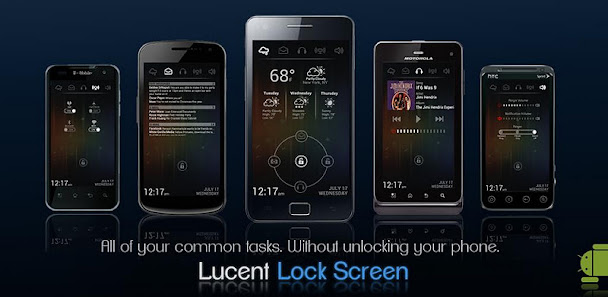
Lucent Lock Screen v1.0.1 (1.0.1) Android Apk App


Requirements: Android 2.2+
Overview: Beautiful, Simple, Fast and easy to use, Lucent Lock Screen allows you to access your weather, music, messages, power and volume settings from one easy lock screen!

Lucent Lock Screen gives you access to all of the most-used controls on Android devices:
Weather: Customizable weather updates available based on GPS or pre-determined location entered by you.

Music: Read the current playing track, control the volume and play, pause, and skip forward and back from one screen.

Messages: Don’t have time to unlock your phone? View your latest text messages and tap to open them in case they’re important!

Connectivity: Going on a flight? Toggle “Flight Mode”, or simply use the control widgets on-screen to toggle WiFi and GPS connections.

System Volumes: Control your notification, ring-tone and music volumes directly from one screen. Don’t want to drag your finger all the way to volume down? Simply tap the red speaker to instantly mute that particular volume!

The Lock Ring: Our fast-acting lock ring gives you access to the most used functions on Android devices. It’s easy! Swipe up for that quick text message, left to capture that moment you can’t afford to miss, down for your full music controls, and of course right to unlock!

SPECIAL MESSAGE: For those experiencing the stock Android lock screen overlaying Lucent Lock, we recommend downloading “No Lock” for free from the Android Market in order to fully disable your devices stock lock screen.

Download:
http://www.filesonic.com/file/408271...L.S.v1.0.1.apk
http://ul.to/4rav0v5e
Related Posts Plugin for WordPress, Blogger...