Free Android APK Games| Apps | Applications | Themes

Showing posts with label Review. Show all posts

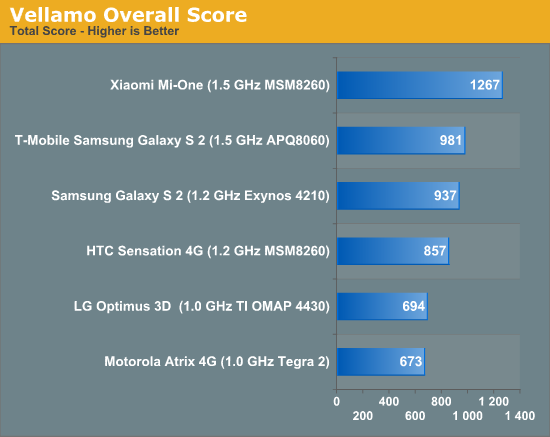
Xiaomi M1 Faster than Samsung Galaxy S2 and Motorola Atrix!!


xiaomi android phone beijing Xiaomi M1 Faster than Samsung Galaxy S2 and Motorola Atrix!!
The Xiaomi M1 dual core Android phone is really from China is really beginning to look like fantastic value for money and a very powerful Android device!
The M1 from Xiaomi has been available on limited release for a few months and will get a public release next month, however Anandtech have managed to score a Xiaomi M1 along with 7 other more well known, and more expensive, Android phones to test.
Surprisingly the Xiaomi, costing half that of many of the other phones on test, managed to best the big name brand handsets in 7 tests out of 11 conducted.
The handsets the Xiaomi was pitted against were:
  • Samsung Galaxy S II (T-mobile)
  • Motorola Atrix
  • Samsung Galaxy S II (AT&T)
  • HTC Sensation
  • LG Optimus 3D
Each of the phones above are top of the range fully loaded Android phones, yet the bargain Xiaomi, 1999 Yuan ($310) managed to mix it with the big boys!
42213 Xiaomi M1 Faster than Samsung Galaxy S2 and Motorola Atrix!!We truly can’t wait to get our hands on the Xiaomi M1 for test to see just how well it performs!
You can see the full test results and report Anandtech here.

Olive is the first full length feature film shot completely on a N8


The rapid progress that cameraphone have been making over the past few years is no secret for anyone, but shooting a whole movie on one? Yes, please! – said phone directors Hooman Khalili and Patrick Gilles and proceeded to shoot their full length feature film Olive on a Nokia N8.

gsmarena 001 Olive is the first full length feature film shot completely on a N8
We are talking a full cinema-ready movie here that should be hitting theaters in the US soon. And all it took for the N8 to turn into a piece of cinematic gear was a 35 mm lens adapter, which was modified to fit the smart phone in order to achieve the needed shallow depth of field.
The film stars two-time Academy Award nominated actress Gena Rowlands as well as John Scurti, Chris Maher, and Ruby Alexander. And the sound design was created by the George Lucas-owned Skywalker Sound.
Check out some footage from the making and the opening scene of the movie.

The ambitious goal that the authors of the projects are now trying to achieve is bringing Olive to over 2,000 theathers in the US. According to them, this will be the first movie to do so without the backing of a major studio.
If you are interested to help the project you may follow the source link and make a contribution. If you are generous enough you might even get a mention in the credits or get a ticket for the premiere or even a dinner with the directors.

What Is Ice Cream Sandwich Android 4.0.1?


4.x Ice Cream Sandwich

The Galaxy Nexus introduced Android 4.0.1 Ice Cream Sandwich.
Android 4.0 – codenamed Ice Cream Sandwich – was previewed at the May 2011 Google I/O event,[51] and officially launched at the Galaxy Nexus and Ice Cream Sandwich release event on 19 October 2011.[52] The SDK for Android 4.0 was publicly released on 19 October 2011.[53] Google's Gabe Cohen stated that ICS was "theoretically compatible" with any Android 2.3.x device in production at that time.[54] The source code for ICS became available on 14 November 2011, three days before the Galaxy Nexus was released.[55] New features included:[56][57][58]
  • Virtual buttons in the UI, in place of capacitive or physical buttons
  • Separation of widgets in a new tab, listed in a similar list to apps
  • Easier-to-create folders, with a drag-and-drop style
  • A customizable launcher
  • Improved visual voicemail with the ability to speed up or slow down voicemail messages
  • Pinch-to-zoom functionality in the calendar
  • Offline search, a two-line preview, and new action bar at the bottom of the Gmail app
  • Ability to swipe left or right to switch between Gmail conversations
  • Integrated screenshot capture (accomplished by holding down the Power and Volume-Down buttons)
  • Improved error correction on the keyboard
  • Ability to access apps directly from lock screen (similar to the HTC Sense 3.x)
  • Improved copy and paste functionality
  • Better voice integration and continuous, real-time speech to text dictation
  • Face Unlock, a feature that allows users to unlock handsets using facial recognition software
  • New tabbed web browser, allowing up to 16 tabs
  • Automatic syncing of browser with users' Chrome bookmarks
  • Modern Roboto font
  • Data Usage section in settings that lets users set warnings when they approach a certain usage limit, and disable data when the limit is exceeded
  • Ability to shut down apps that are using data in the background
  • Improved camera app with zero shutter lag, time lapse settings, panorama mode, and the ability to zoom while recording
  • Built-in photo editor
  • New gallery layout, organized by location and person
  • Refreshed 'People' app with social network integration, status updates and hi-res images
  • Android Beam, a NFC feature that lets user exchange web bookmarks, contact info, directions, YouTube, etc.
  • Hardware acceleration of the UI[59]
  • Resizeable widgets – already part of Android 3.1 for tablets, but new for cellphones[60]
  • Wi-Fi Direct[61]
  • 1080p video recording for stock Android devices
Source wikipedia

[Productivity] WhitePages with Caller ID v3.5.1 Full (3.5.1) Apk App


WhitePages with Caller ID 3.5.1 Full
Requirements: Android 2.1+ 
Overview: Identify unknown callers and avoid telemarketers with Caller ID from WhitePages.
The largest Android Caller ID service with over 600 million numbers! Includes mobile/cell phones, company & work listings, household members and more.


Please upgrade to the most recent version to fix a recent issue causing app crashes. We apologize for the problems this caused. 

Look up incoming calls automatically, either during or after the call. 

Add WhitePages info to your phone contacts, or share by email or text.

Includes full WhitePages & Yellow Pages search to find find friends and nearby businesses fast! 

The app comes with 6 months of Premium Caller ID. After 6 months, you'll have the option to renew Premium Caller ID, or keep using our landline-only Standard Caller ID for free. 

*ID may be post-call on Verizon/Sprint 

"Best Android Apps to Boost your Productivity" - Lifehacker

"If your cell phone number has fallen into the hands of telemarketers, don’t worry: White Pages has you covered." - Network World

Download:
http://www.filesonic.com/file/346892..._ID_v3.5.1.zip

[Full] TaskKiller Pro v2.1.1 (2.1.1) Android Apk App


Task Killer Pro 2.1.1
Requirements: Android OS
Overview: Taskkiller Pro helps increase your phone battery life, speed up your phone, and manage all your applications. It kills tasks when the screen turns off, sets up black lists, does batch uninstalls, moves apps to the SD card, and tracks memory usage.


[break]
Increase the battery life and speed of your phone. Do the same, longer...
Taskkiller Pro helps increase your phone battery life, speed up your phone, and manage all your applications. It kills tasks when the screen turns off, sets up black lists, does batch uninstalls, moves apps to the SD card, and tracks memory usage.
Android phones keep unused running programs in memory. Using multiple applications in a session can cause the phones RAM to be overloaded. Overloaded RAM consumes battery and slows down the phone performances. Taskkiller Pro ends unused tasks kept in memory, thus speeding up your phone and extend its battery life. You can setup Taskkiller Pro to end unused tasks when the phone screen turns off by using the KILL ON PAUSE functionality. You can also setup TaskKiller Pro to end unused tasks at a given rate by using the AUTO KILL functionality. The AUTO KILL functionality can be active only when the phone is asleep or when the phone screen is on. The combination of the AUTO KILL and the KILL ON PAUSE functions are very effective in saving the battery life. Foreground activities can be excluded from the kill process in order not to stop a work in progress. Tasks can also be ended manually from the application or by using the Taskkiller widget.
A combination of four black lists allows a fine configuration of a task managed by Taskkiller. The SYSTEM black list includes every application that TaskKiller will never end. The SYSTEM black list includes by default any application that was bundled with the phone. The AUTO KILL black list includes the applications that shouldn't be killed at a given rate. The KILL ON PAUSE black list includes the applications that shouldn't be killed when the phone screen is turned off. With apps such as MP3 players and GPS trackers, it's a good idea to use the KILL ON PAUSE and the AUTO KILL blacklists as you don't want these applications to be killed while running as a background service.
The uninstaller tool is designed to help you uninstall one or more applications from the phone. It displays the list of installed applications with the location (SD or not), size and setup date. You just have to select the applications you want to remove and click on the REMOVE button to uninstall them all very fast.
The move 2 SD tool is designed to help you change the setup location of the phone applications. The tool is only available for Android 2.2 and above. Select applications that can be moved to SD and click on the MOVE 2 SD button to move selected applications to the SD card. You can also move applications from the SD card to the phone internal memory. A notification will help you to know when an installed application can be moved to the SD card

Download:
TaskKiller Pro v2.1.1.apk (215 KB)
http://www.multiupload.com/7Y26JVC4TM

Android Seven Launcher-Full v1.4 (1.4) Android Apk App


Android Seven Launcher-Full 1.4
Requirements: Android 2.2+
Overview: A taste of win7 on your android devices. its all in one launcher, file browser.
Android Seven- Next Generation Free Launcher


[break]
A taste of win7 on your android devices. its all in one launcher, file browser.
Android Seven- Next Generation Free Launcher
Enjoy the real look and feel of Wind ows 7 on your Android phone. The real interface HOME SCREEN with all features that are must for a Launcher.
It has more features than others available launchers in the market like SPB Shell or ADW Launcher.
FEATURES for Android 7 as follows
Zip Unzip files folder
Explorer
Tools
View different format of files
Drag and drop feature
Cut, Copy and Paste feature
Install new application on phone with this Launcher
OPEN EPUB directly from your SD Card
Widgets
NO NEED TO DOWNLOAD OTHER FILE EXPLORERS, ZIP APPS OR, Theme or wallpaper applications. It has ALL IN ONE ANDROID 7 APP.
The highlited feature of this app is: 
You can use this application with any sized LCD, any resolution, any android mobile and tablets!

Download:
A14.apk (1.2 MB)
http://www.multiupload.com/L4JJ4AE500

Droid Scan Pro PDF v5.0 (5.0) Android Apk App


Droid Scan Pro PDF 5.0 
Requirements: Android 1.6+
Overview: Turn your mobile phone into a document scanner that goes where you go
One solution, with PDF creation, for business cards, receipts, full page documents and much more.


[break]
Turn your mobile phone into a document scanner that goes where you go
One solution, with PDF creation, for business cards, receipts, full page documents and much more.
Unique, state of the art features, including:
- Batch processing, including turbo import, turbo capture, and batch convert, so that multi-page documents can be created with just a few taps.
- Integrates with OCR by Google Docs, Evernote, and Google Goggles.
- Document shape recognition, for perfectly shaped, professional-looking scans.
** AS FEATURED ON WIRED
Turn your mobile phone into a document scanner that goes where you go. Convert any snapshot into a highly readable JPEG or PDF by fixing geometry, contrast, and color.
** Please try free version first (Droid Scan Lite).
Record business cards, white boards, full page documents, and receipts. On-phone conversion: complete confidentiality, no subscription fees.
Multiple resolutions available from low-res, suitable for quick sharing via email, to highest fidelity reproductions suitable for OCR and printed copy.
Automatic recognition of document shapes like US Letter, A4, Business card, and more.
Easy creation of multi-page PDF documents and ZIP files using the built-in scan gallery.
Share via email, Box.net, Dropbox, HP iPrint, and many more.
** Please note: if you prefer the standard import feature in DS Lite, it is available in this app as well by using the Preferences screen to turn off "Turbo import."
** Scanning sensitive documents? You're safe. See detailed information about privacy: http://goo.gl/7Kg5v
** Droid Incredible users: set your camera app to store images on the SD card in order to use turbo capture.


Download:
Droid Scan Pro PDF 5.0.apk (615 KB)
http://www.multiupload.com/YSFZ3WKRQJ

Extended Controls v5.4.7 (5.4.7) Android Apk App


Extended Controls 5.4.7
Requirements: Android OS 1.5+
Overview: Extended controls is THE MUST HAVE APP for every Android user. It provides a totally customizable widgets, many advanced settings for any widget (more than 30 toggles each).


Extended Controls provides user-friendly graphic interface and a easy configuration manager.
With its features user can customize his widgets and he can beautify his fantastic Android smartphone.

Features:
Custom backgrounds (you can choose from your gallery or download a set of backgrounds from the web);
Change Widgets transparency;
A lot of different icons;
Edit exists widgets; 
Customizable colors;
Customizable labels;
Enable/Disable dividers;
Label colors;
Different widgets size (over 10 toggle for any single widget);
Different indicator type (standard or circular)

Advanced features:
Widgets in notification bar;
Possibility to remove widgets size from android menu;
Disable static indicator;
Show wallpaper in widget configuration;
Widget preview of your widget on configuration activity

Profiles mode:
Only app that saves your widgets and allow you to load it whenever you want!!!!

As we know Android provides a widget that allows you to enable or disable these settings: WiFi,Bluetooth,GPS,Sync,Brightness.
Don’t you think that the widget is insufficient since we use other settings more than these above? With Extended Controls, Android Power Widget can be improved allowing users to add main settings:
- 2G-3G (Shortcut + label network)
- 4G Toggle (WiMAX for EVO)
- APN (Renaming APN or Direct Mode)
- Wifi (with indicator label)
- Bluetooth
- Brightness (High customization, with custom seekbar, label percentage, native mode)
- Direct GPS (No shortcut)
- Auto Sync
- Auto Rotate
- Airplane Mode (Fly mode)
- SD Scanner
- Silent Mode
- Vibration Mode
- Timeout (customizable with label)
- Stay Awake toggle
- Torch (Nexus One, Samsung Galaxy S, HTC Desire, HTC Legend, Sony Ericsson X10mini, Sony Ericsson X10, Motorola DroidX, Motorola Droid, Milestone, Verizon etc...)
- Mount USB
- AlwaysOn feature
- AutoLock
- Reboot (only for root users!! bootloader, normal or fastboot, confirm dialog)
- Battery (image, percentage or image percentage; color label)
- Locale
- Hotspot Wifi
- USB Tether
- LockPattern
- AudioManager (Switch directly from mute, vibration and normal mode)
- Lock Screen (turn your screen off)
- Direct Shortcut app (All activities or applications)

What's in this version:
Restored Direct Switch for Data Network toggle;
Fixed lag problems;
Share your profile!!
Share your widget image!!
Improved toggles performance
Improved battery life with one-shot receivers;
Fixed blur problem when adding widget;
Fixed title bar on configuration panel
Fixed "Thunderbolt" Toast on flashlight toggle;
Removed Notification icon
Added volume key down-up for Volume toggle
Added "User Ringer volume for Notification" in Volume toggle
Fixed landscape scroll for Volume toggle

Download:
e547.apk (2.4 MB)
http://www.multiupload.com/K0U9VZQC1R
Fake-Call Me - Pro v1.3.3 (1.3.3) Android Apk App


Fake-Call Me - Pro Version 1.3.3
Requirements:ANDROID 
Overview:Get out of awkward situation by giving yourself a fake-call! Be free. 

[break]
Get out of awkward situation by giving yourself a fake-call! Be free.
BACK BUTTON ENDS CALL
Get out of awkward situations by giving yourself a fake-call. Schedule multiple fake calls to make it like really urgent to get out of whatever situation
* the app is renamed to FCM Pro once it's installed
* Spoof,Prank
* pick contact from phone book as fake caller
* customize ringtone & vibration-alarm clock
* add fake call to call log
* play pre-recorded voice when call is answered
* widget, shortcut for quick fake-calling. You can use guesture on home screen to trigger a fake call if you use home application such as Go Launcher Ex that supports using guesture to invoke a shortcut. See http://blog.mobileappbuilder.com/post/9270653909/howto-initiate-a-fake-call-with-a-swipe-of-finger-on for instruction
* can schedule fake call on a particular time(some users have used it as an alarm)
* If your phone runs Android 2.2 or above: install the app to SD-card if SD-card is available; allow moving the app to SD-card. Note that if while you copy files between SD-card and your computer, the app cannot be run, and your already-scheduled fake-calls will not work.
There's no way for us to respond to your comments on Andorid Market. Please report any problem to support a@t mobileappbuilder.com. If the fake call screens don't look like the real ones, let us know as we want to support as many devices as possible.

What's in this version:
fixed the problem where the app couldn't be installed on sd-card for some HTC phones. If you are upgrading from a previous version and having problem moving the app to sd-card, please uninstall and re-install the app. If you still have problems, please email us at support a*t mobileappbuilder.com(replace a*t with @).


Download:
Face_Call_Me_Pro_v.1.3.3.apk (1.6 MB)
http://www.multiupload.com/6MWGLCXWO0

Mr. LOMO Full v2.0 (2.0) Android Apk App


Mr. LOMO Full 2.0 
Requirements: Android 2.1+
Overview: Mr. LOMO is Best photo editing application designed for Android Phone.


[break]
Mr. LOMO is Best photo editing application designed for Android Phone.
It's all about one thing.. GREAT PHOTOS!
- Basic 12 Effects and effect updates every weeks.
- Every effects tested by famous photo graphers.
- No complex color adjustments, (make easy)
- No tools needed. (make faster)
It all does it in one-click!
All you need to do is to tap on the screen
and a beautiful picture will be taken and save in the photo album!

Download Instructions:
http://www.filesonic.com/file/332257...market.com.apk

jVault FULL v1.0 (1.0) Android Apk App


jVault 1.0 
Requirements: Android 2.1+
Overview: jVault is an application designed to store sensitive information on the Android smartphone and tablet devices.


[break]
jVault is an application designed to store sensitive information on the Android smartphone and tablet devices. Passwords, bank account numbers, PINs, insurance cards, and other private data can readily be available at your fingertips. All data is stored using the AES (Advanced Encryption Standard) format (adopted by the US Government and now used worldwide). As such, your data is safe in the event of a lost phone handset.
Multiple "wallets" can be created in jVault, each with "cards" of data grouped in individual categories. With jVault, you can easily recall important information on your Android device in an instant. A search feature is available allowing you to search all the cards for a specific text string, making it easy to find information among numerous cards.
INTRODUCTORY PRICE OF $1.99 US (Limited Time)
FEATURES
- Easy to use Interface
- Ability to define multiple wallets
- Categories can be defined in each wallet
- Card field labels can be customized by the user
- Several pre-defined field labels are available using templates
- Data is secured using the AES Encryption Algorithm
- A single master password protects all wallet data
- Timed lockout due to inactivity
- Searching feature
- Fast operation
- Random password generator feature
- Web URLs, phone numbers, and email addresses are automatically converted to hyperlinks
- Backup and Restore the jVault database using the online DropBox option
- Custom template editor
- Ability to copy text from data fields into the clipboard buffer
- Export unencrypted data to a CSV file
- Import data from a CSV file
jVault is designed to run on the Android OS smartphone and tablet devices.
The minimum Android OS level is 2.1, so it should run on Eclair, Froyo, Gingerbread, and Honeycomb code-named OS versions.

Download Instructions:
http://www.filesonic.com/file/3496818215/j10.apk

Lyrics Finder Pro v2.0.0 (2.0.0) Android Apk App


Lyrics Finder Pro 2.0.0 
Requirements: Android 2.1+
Overview: Lyrics Finder Pro - find lyrics to every song your device


[break]
Lyrics Finder Pro - find lyrics to every song your device
Lyrics Finder finds lyrics and youtube video clips for all the songs on your device, and immediately saves lyrics on your device's hard drive for faster repeated viewing and for offline mode! Also, Lyrics Finder lets you email your lyrics with a single click.
Lyrics Finder lets you view lyrics directly in a single comfortable interface.
Lyrics Finder is the number one Lyrics App on the Apple App Store since January 2011 and has more than 100,000 paid downloads.
Noteworthy: 
✔ Lyrics database updated every day.
✔ Free lyrics search.
✔ Transfer lyrics to your computer simply by coping text files from your device.
✔ Landscape orientation support. . 
✔ Control font size using a simple pinch gesture. 
✔ Control playback within the application using the player controls.
✔ Lyrics browser for saved lyrics.

Download Instructions:

Xperia X8/W8 Custom Android 2.3.7 CM7.1


Alright people has asked me why should they install the custom version of Android 2.3.7
Wouldn't that stock eclair work well as it is ofically produce by Sony Ericsson
To be truth that sony ericsson has stopped the update till 2.1 only so you couldn't have any futher update
So sorry to say that but is true :(

So why Android 2.3.7 ?
  1. I tested before the androi 2.3.5 rom and it worked flawless and fast
  2. You have the latest update and phone support more latest apps and games
  3. Apps2sd that doesn't exist in android 2.1 (Save apps and games to memory card =D)
  4. More Ram and support overclocking (original 600mhz,with Custom we can overclock up to 800mhz depent to your phone)
  5. Root apps and capable to install chainfire3d pro better support and native boost on HD Games
Even test on http://droidxda.blogspot.com/2011/09/latest-updated-x8why-should-run-custom.html

Custom Android 2.3.7 Features

  • Clean and latest CM7 Nightlies. Latest Gingerbread 2.3.7.
  • Fully working Camera 
  • Minimal number of apps are installed.
  • Lightweight: maximum 99MB of free RAM.
  • My favorite modules: X8Gesture v007, X8Undervolt v001, X8MDDI v001, AX8 SMARTASS
  • The usual things with other ROMs: wifi / bluetooth / usb / sensors / 3d / video / fmradio / camera / rooted / jit / zipaligned / app2sd / ...
  • Smooth. It IS as smooth as CM6 in 2D (menu scrolling/flinging...)
  • WEP adhoc supported
  • Dual Recovery and reboot to xRecovery/CWM
  • CallMeLouder: Louder ringer when the phone is inside bags.
  • Improved Flipping down mutes ringer
  • Flipping down snoozes alarm
  • Disable LED notification in night
  • Back button ends call
  • Built-in Transparent Status Bar support
  • Hide avatar in SMS
  • Quick Copy / Quick Paste
  • View.measure() method caching for improved 2D performance
  • Custom carrier text
  • Built-in loop ringtone support without OGG editing
  • Optimized ("smoothened") scrolling/flinging
  • Random Lockscreen
  • Sense Lockscreen / Boot sound / Ringtone / Live WallPaper
  • Smart dialer
  • Sleep button on Power Control widget
  • Recent apps on status bar
  • Configuration section (with localization for many languages)
 Our favourite rom :
with the function of :
*xloud and bravia engine
* Contact xmp
* DeskClock Semc
* Calender
* Backup and Restore
* Miui Music
* TimeScape
* DigitalClockWidget
* Mms Transparent
* PhotoWidget
* SE Search Widget
* StatusSwitch
* WeatherWidget
* widgetcalendar
* widgetonoff
* XperiaEvents
 What is bravia engine?
[Images]
WITH BRAVIA ENGINE:_____________WITHOUT BRAVIA ENGINE:


XLOUD?
See the test below on Xperia x10


Some score : your x8/w8 can defeat it?

 score based on AnTuTu Benchmark stuff.
I find the fastest ROM for the X8.

Here is our scores:

ROM: GingerDX + Agressive Tweaks - stock kernel
CPU: 800 Mhz
SD: Class10
Score: 3210
User: XtremePeople


Some custom rom screenshot :


Related Posts Plugin for WordPress, Blogger...